Software to Build a Branded Advisor and Client Portal for RIAs (2026)
The software RIAs use to build branded advisor and client portals in 2026, comparing Milemarker Experience Builder, Salesforce Experience Cloud, Orion, Addepar, Black Diamond, eMoney, Wealth Access, InvestCloud and Moxo.

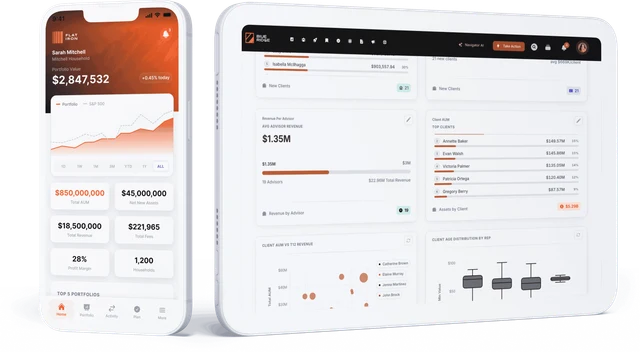
An RIA can build a branded advisor and client portal in three ways: use the portal that comes with its portfolio or planning system (Orion, Addepar, Black Diamond, eMoney), build one on a portal framework (Salesforce Experience Cloud, InvestCloud, Moxo), or use a no-code builder on top of its own unified data. Milemarker Experience Builder is the third option: the firm designs branded advisor and client portals without engineering, wired to one normalized data layer that connects its custodians, CRM, portfolio accounting, planning and billing, with zero vendor branding.
The right choice depends on one question. Should the portal show the data inside one system, or the data across every system the firm runs? A portfolio system’s portal is excellent at its own performance reports. It will not show the CRM, the planning tool or a second custodian unless that data is already inside it.
What makes an advisor or client portal “branded”?
A branded portal is more than a logo in the corner. In practice it means:
- Your domain and your look. The firm’s colors, fonts and URL, with no vendor name on the login screen.
- Your content. Investment committee updates, firm announcements and thought leadership in the portal, not lost in email.
- Role-specific views. A senior advisor, a new associate, an operations lead and a client each see what fits their role.
- Your tools in one place. Shortcuts or embedded widgets for trading, planning and CRM, so the portal is where work starts.
- Your data underneath. Numbers that match what the firm reports everywhere else.
Our guide to a white-label wealth management platform covers the branding side in more depth.
Advisor portal vs. client portal: what is the difference?
An advisor portal (often called a workstation or desktop) is the internal screen an advisor works from: their book, tasks, alerts, firm content and tools. A client portal is the outside screen a client logs into: accounts, performance, documents, goals and messages.
Many RIAs buy these separately, one from the CRM vendor and one from the portfolio vendor. That gives a client one brand and an advisor another. Firms that want both on one brand and one data set look for a single builder that can produce both.
What software can an RIA use to build a branded portal?
1. Milemarker Experience Builder
Milemarker is a data and experience platform for RIAs, broker-dealers, TAMPs and aggregators. It connects custodians such as Schwab, Fidelity Institutional and Altruist, portfolio systems such as Orion, Black Diamond, Tamarac and Addepar, CRMs such as Salesforce, Redtail and Wealthbox, and planning tools such as eMoney and RightCapital into one normalized data layer on Snowflake, in the firm’s own database. Experience Builder is the no-code tool on top for designing advisor and client portals: role-based views, embedded firm content and announcements, shortcuts to the tools advisors use, custom HTML for firm-specific tools, and a white-labeled experience with zero vendor branding. Multi-office firms keep one firm experience while allowing local customization. Access is controlled by advisor, office and role, with SSO.
Best for: RIAs that want one branded portal across every system they already run, without a development team.
2. Salesforce Experience Cloud
Experience Cloud is Salesforce’s framework for building portals and community sites. Salesforce Financial Services Cloud includes a Financial Services Client Portal template for self-service client sites on top of CRM data. It is highly customizable, but building and maintaining it usually needs Salesforce specialists, and licensing is per member or login. Our Experience Cloud alternatives guide goes through the trade-offs.
Best for: RIAs already deep in Salesforce with admin or partner capacity to build and run a portal.
3. Orion client portal
Orion offers a client portal and mobile app that show the performance, holdings and reports calculated in Orion’s portfolio accounting, with firm branding.
Best for: RIAs that run portfolio accounting on Orion and want a client portal from the same vendor.
4. Addepar client portal
Addepar’s client portal gives clients access to Addepar’s reporting and analysis, which handles complex holdings, alternatives and entity structures well.
Best for: family offices and RIAs with complex wealth whose reporting already lives in Addepar.
5. Black Diamond client portal
Black Diamond, from SS&C Advent, includes a branded client portal and app alongside its portfolio reporting, with document vault and performance views.
Best for: RIAs that want polished client-facing performance reporting from their portfolio system.
6. eMoney client portal
eMoney’s client portal is included in its planning packages. Clients see their finances in one place, aggregate outside accounts, track goals and store documents in a vault.
Best for: planning-led RIAs whose client experience centers on the financial plan.
7. Wealth Access
Wealth Access builds a unified client record across wealth, banking, trust and retirement data and distributes it to advisor dashboards, client portals, CRMs and APIs. Many institutions embed its widgets in Salesforce or a digital banking platform.
Best for: banks and trust companies combining wealth and banking relationships.
8. InvestCloud
InvestCloud is a digital wealth platform for advisors, institutions and investors, with a branded client experience across desktop and mobile. It is typically used by larger wealth managers and private banks.
Best for: large enterprises building a custom digital wealth experience with a vendor partner.
9. Moxo
Moxo is a general-purpose, white-label client portal for onboarding, document exchange, messaging and approvals. It is not wealth-specific, but it is used by financial firms for secure client workflows.
Best for: firms that mainly need a branded space for documents, messages and onboarding tasks.
How do the options compare?
| Vendor | Type | Best for | Works with existing stack? |
|---|---|---|---|
| Milemarker Experience Builder | No-code portal builder on a unified data platform | One branded portal across every system | Yes, connects to existing custodians, CRM, portfolio and planning |
| Salesforce Experience Cloud | Portal framework on CRM | Salesforce-centric firms | Best on Salesforce data |
| Orion client portal | Portfolio system portal | Orion-based RIAs | Best on Orion data |
| Addepar client portal | Portfolio and analysis portal | Complex wealth | Best on Addepar data |
| Black Diamond client portal | Portfolio system portal | Client-facing reporting | Best on Black Diamond data |
| eMoney client portal | Planning portal | Planning-led firms | Best on eMoney data, with account aggregation |
| Wealth Access | Unified client record and widgets | Banks and trust companies | Yes, embeds in existing tools |
| InvestCloud | Enterprise digital wealth platform | Large enterprises | Through implementation projects |
| Moxo | General white-label client portal | Documents and onboarding | Through integrations |
How should an RIA choose portal software?
- List what the portal must show. Performance only, or also CRM activity, plans, documents, billing and held-away assets?
- Count your systems. If most of that data sits in one platform, that platform’s portal may be enough. If it spans four or five, you need a data layer underneath.
- Decide who builds it. No-code tools let operations own the portal. Frameworks need developers or a partner.
- Check the brand rules. Can you remove all vendor branding, use your domain and keep one look across advisor and client screens?
- Check permissions. Advisors should see only their book, clients only their household, leadership the firm.
- Plan for change. New offices, new custodians and acquisitions should not mean rebuilding the portal.
Why do branded portals still show the wrong numbers?
Most portal problems are data problems. If the client portal pulls from the portfolio system and the advisor portal pulls from the CRM, the same household can show two different values. The fix is to build both on one normalized data layer, so AUM, accounts and household definitions are set once. The Milemarker Data Engine is that layer, and the advisor experience platform guide shows how portals sit on top of it.
Frequently asked questions
Can an RIA build a branded portal without developers?
Yes, with a no-code builder. Milemarker Experience Builder is designed for operations and marketing teams to build and change portals without engineering. Framework tools such as Experience Cloud usually need developers or a partner.
Do I have to replace my portfolio system to get a better portal?
No. Milemarker connects to existing systems such as Orion, Black Diamond, Tamarac and Addepar rather than replacing them, so the portal can show their data alongside CRM and planning data.
Can advisors and clients use the same portal software?
Yes. Experience Builder builds both advisor and client experiences on the same data and brand, with access set by role.
Is a portfolio system’s client portal good enough?
Often, if the firm runs one portfolio system and clients mainly want performance reports. It becomes limiting when clients or advisors need data from other systems too.
How long does it take to launch a branded portal?
It depends on how many systems feed it. Typical Milemarker implementation, including connecting the data, is 2 to 12 weeks.